
This is how to reconcile payments made from your bank to pay off your credit card.
This may appear in your bank account as a payment of one lump sum for multiple credit card transactions or a single transaction:
In order to reconcile you will need to ensure that all transactions have been entered into the system correctly by following the instructions in the article below.
How to record payments made with a credit card.
If the payment to the credit card matches the expenditure on the credit card account e.g. you spent £500 on your credit card and you paid off £500 to your credit card follow the instructions in Section 1.
If the payment to the credit card is a general sum e.g. you spent £550 on your credit card and you paid off £400 follow the instructions in Section 2.
Section 1 - Reconciling your credit card payments
- Open the banking window
- Click select account - open the credit card account
- Tick all the transactions that are included in the sum you paid the credit card company
- Click Create batch payment
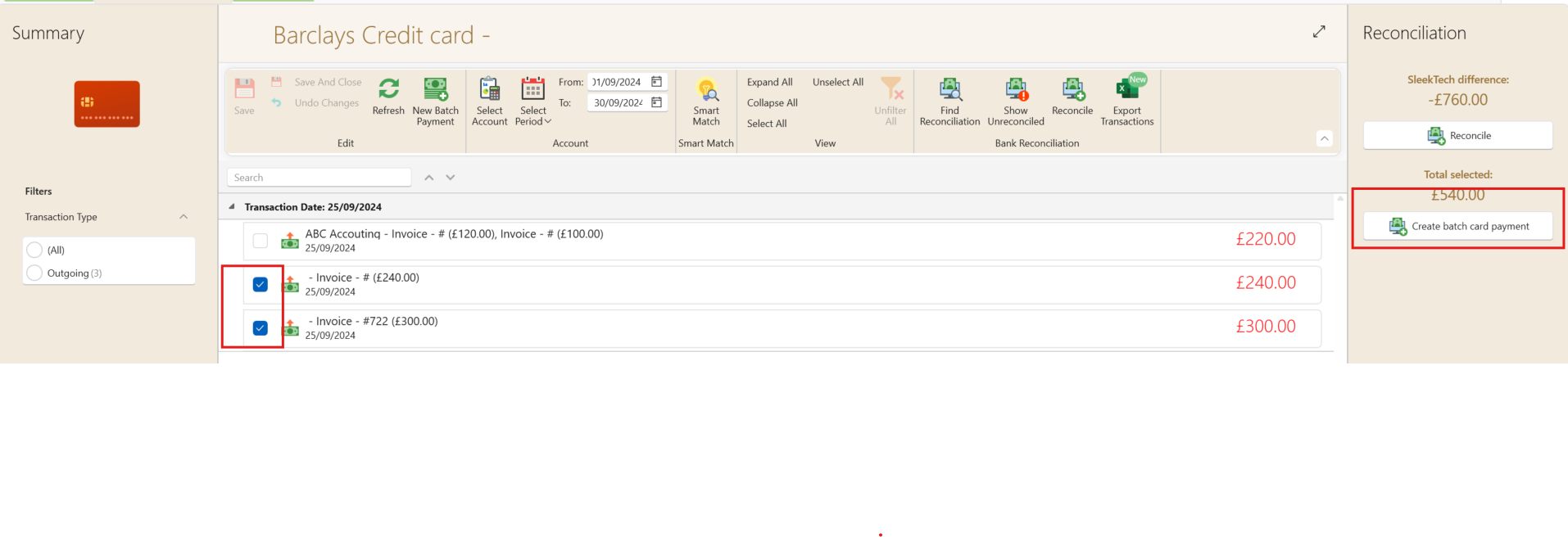
- A batch payment will now be created, select the account you paid off the credit card with e.g. Barclays client account then click Save on the batch payment window.
The payment is now complete you can view and reconcile this payment in your selected bank account.
On the right side of your credit card account window the Reconcile summary will show you a running calculation of how much is outstanding on your credit card.
Section 2 - Reconciling your credit card payments - General Sum
- Open the banking window
- Click select account - open the credit card account
- Calculate all the transactions that will amount as close as possible to the pay-out amount.
You will now need to select a payment and split it into 2 payments
- Calculate how much you need to close the gap e.g. you paid out £400 and your selected transactions equal to £375, the amount needed to close the gap will be £25.
- Open the payment of a transaction paid off by your credit card that you did not include in your calculation above and edit the payment to the gap amount.
- Create another payment for any expense that was paid off by this credit card for the balance e.g. the original payment was £100 you changed it to £25 you now need to create a new separate payment for an expense that was paid by the credit card of £75.
- On the credit card banking page - Tick the transactions as calculated above.
- Click Create batch payment.
- A batch payment will now be created, select the account you paid off the credit card with e.g. Barclays client account then click Save on the batch payment window.
The payment is now complete, you can view and reconcile this payment in your selected bank account.
Credit Card balance
On the right side of your credit card account window the Reconcile summary will show you a running calculation of how much is outstanding on your credit card.