
This is how to deal with a situation where you mistakenly sent too much funds to a supplier:
The supplier will either keep the extra funds and tell you to apply them to a future invoice, or return the funds to you. Please select the option that applies to your situation and follow the relevant instructions below.
The supplier tells you to keep the funds and apply it to a future invoice:
- Create the invoice and apply the payment in the bank as usual.
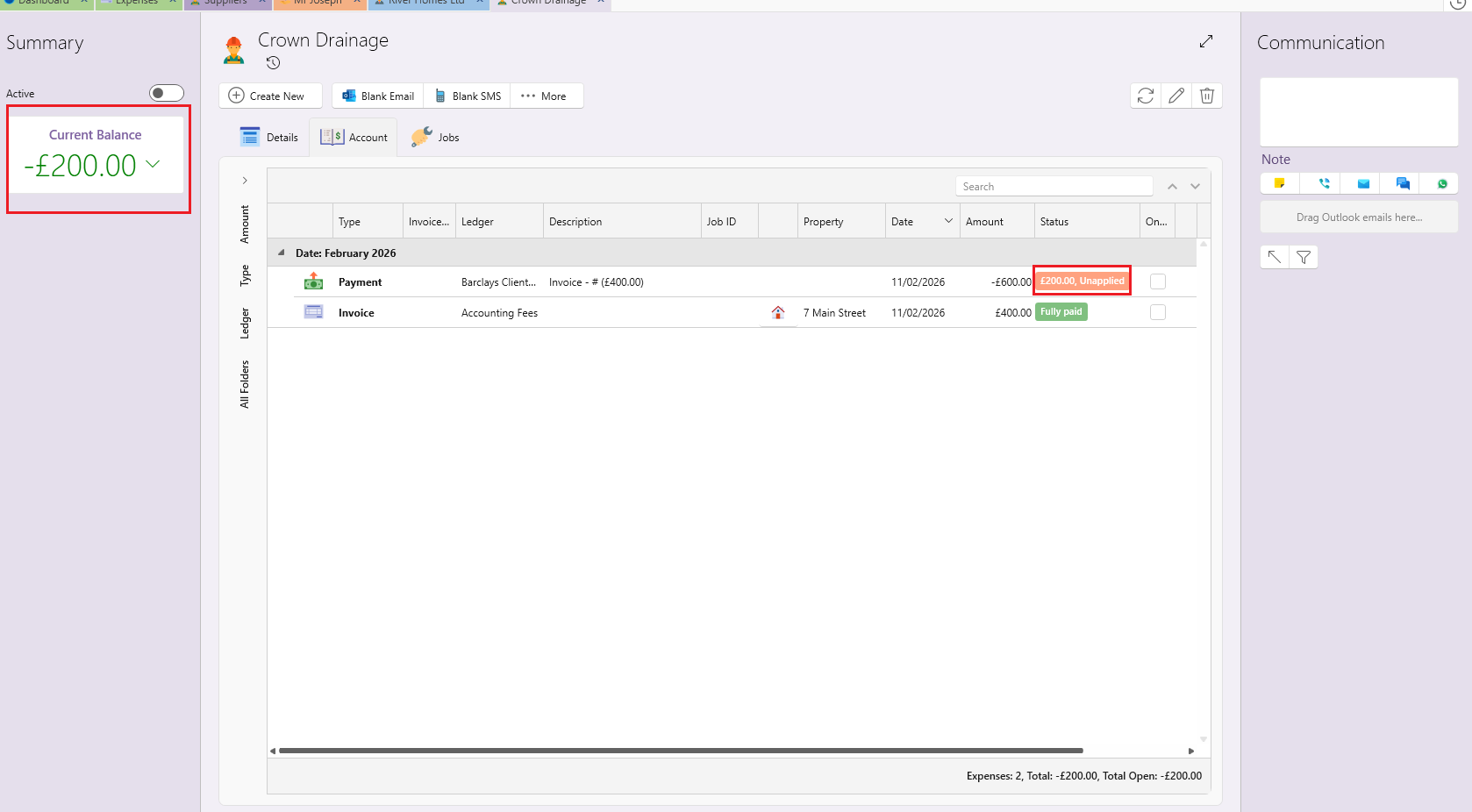
- Since the payment amount is higher than the invoice total, part of the payment will remain unapplied. In the banking view, everything will appear correct. On the supplier’s account, the overpayment will show as an unapplied amount under the payment and will also be reflected in the supplier’s balance. This will serve as a reminder to apply it later.
- When you receive the next invoice from this supplier, apply the outstanding unapplied amount from that payment to the new invoice.
The supplier refunds you for the overpaid amount:
- Go to the supplier page
- Click on Create New and then on New Refund and enter the amount that was overpaid.
- Save and close.
- Go to the outgoing payment that you have made to the supplier.
- Apply the payment to the relevant invoice(s) and to the newly created refund. The payment should now show as fully applied.
- Open the refund payment that you received back from the supplier.
- Apply it to the same refund.