
How to apply rent that was received after a property or lease was made inactive.
For an inactive Property follow the steps below to receive rent or other payments:
- Click find property then slide the toggle from Active to All to show all properties.
- Click on the Not Active status in order to filter your search to just non active properties.
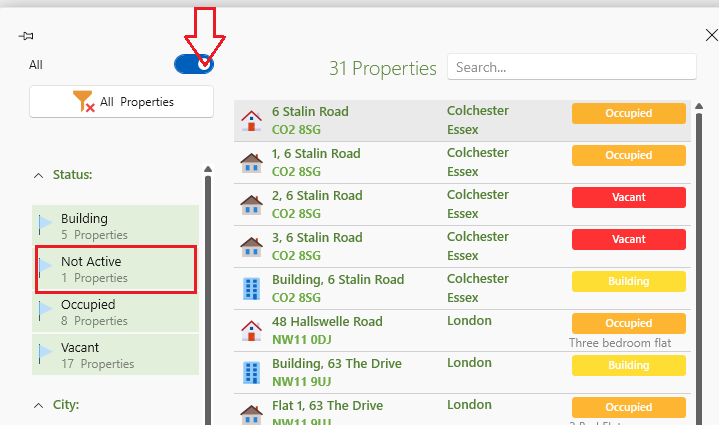
- Once you are on the property page slide the toggle from Inactive to Active.
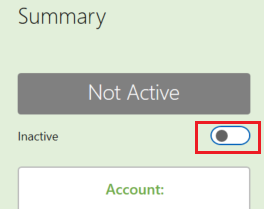
The property is now active you can add charges to the property or lease.
Once you have completed your required charges you can deactivate the property again.
- When sending the landlord a statement this transaction will show up as usual.
- If you no longer service the owner you will need to generate a statement for the income received.
For an inactive Lease follow the steps below to receive rent or other payments:
- Click Find Lease then slide the toggle from Active to All to show all Leases.
- Click on the Terminated status in order to filter your search to just non active leases.
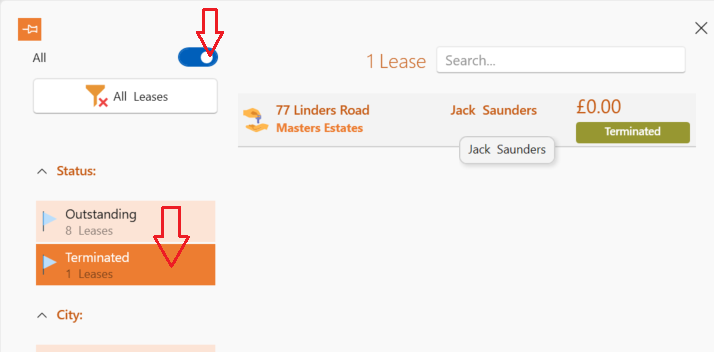
- Select the required lease .
- Activate the tenancy by Clicking on the Reopen Lease icon
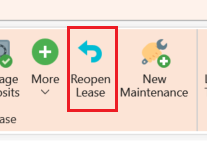
- Refresh
- Apply the rent or charge.( If applying rent you can either create a non rent invoice ensuring you click set rental fee for your commission or edit the dates on the lease details page to add the rent dates you need to charge for.)
When sending the landlord a statement this transaction will show up as usual.
If you no longer service the owner you will need to generate a statement for the rent received.
How to apply rent to a tenant that was not put on to the SleekTech system.
If you currently service the property:
You can create an additional lease and process the charges - then Inactivate the lease.
If you have not put the owner or property on the system :
- You will need to create a new property and lease.
- Put in the lease date for the period that you received the rental income .
- Create an invoice for the rental period.
- Apply the payment.
- Inactivate the Property and Lease .
When sending the landlord a statement this transaction will show up as usual.
If you no longer service the owner you will need to generate a statement for the rent received.