
A tenant has independently covered the costs of repairs or maintenance, which you will deduct from that months rent.
However, you already have the invoice from the supplier on the system, and you want a record that the supplier did the job.
- Pay the invoice from the suppliers page by clicking on the Pay button next to the invoice.
- Go to the lease page
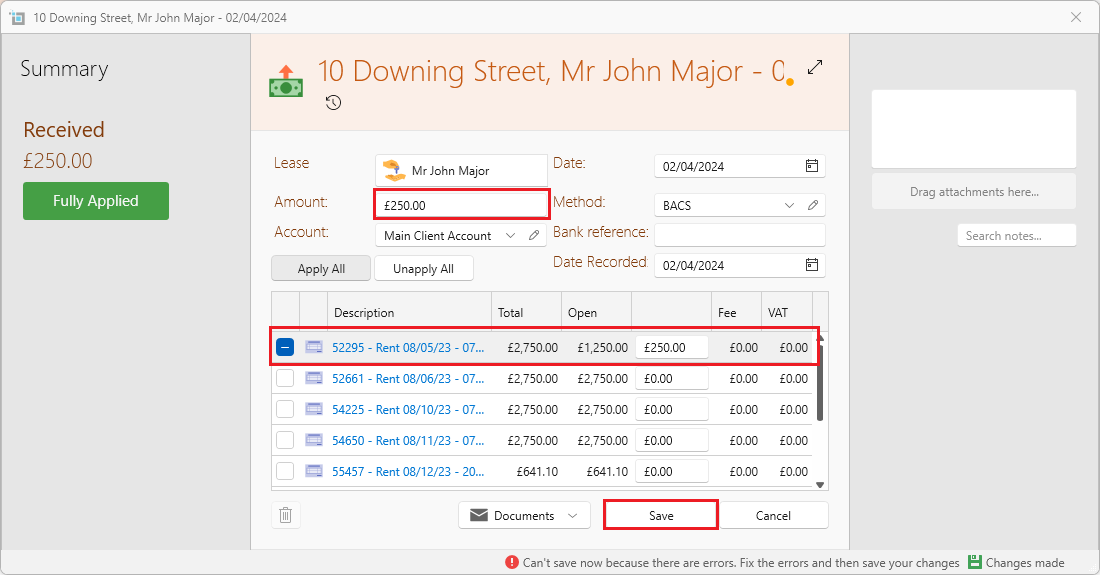
- Click on New payment from the page ribbon
- Enter the Amount the same as the amount on the suppliers invoice.
- Apply it to any of the monthly rent.
- Click on Save
- Wait until the next time that the tenant sends in money for rent and then:
- Click on Batch payment under the dropdown of the incoming payment.
- Apply it to the paid invoice from the supplier, and also to the payment made on the tenants page. (which will equal zero)
- Then bring in the invoice for that months rent as usual.
Even though the amount will be zero, it will ensure that the invoice is reconciled somewhere.
Want to know more?
If the tenant has paid the supplier directly which will be deducted from the rent, but the owner wants to see there was an income, click here: Tenant paid supplier directly, which will be deducted from rent
If the tenant has paid the supplier directly, and wants the funds to be sent back to him, click here: Tenant paid supplier directly and requests the funds to be returned