
In this article we explain how Bank tags help the system match rent payments using Smart Match. Each time a payment is received, the system saves the reference on the tenant or supplier page. This helps Smart Match recognise the payment the next time it comes in.
You may sometimes find that Smart Match is not picking up correctly. This may be due to the fact that there are more references than needed.
Sometimes smart match in banking can get confused from general terms such as "London", "Flat 2" etc.
If you see a specific tenant is constantly showing up incorrectly when smart match is used, use these steps :
- In the Tenants page find the More tab.
- Find the Bank tags section.
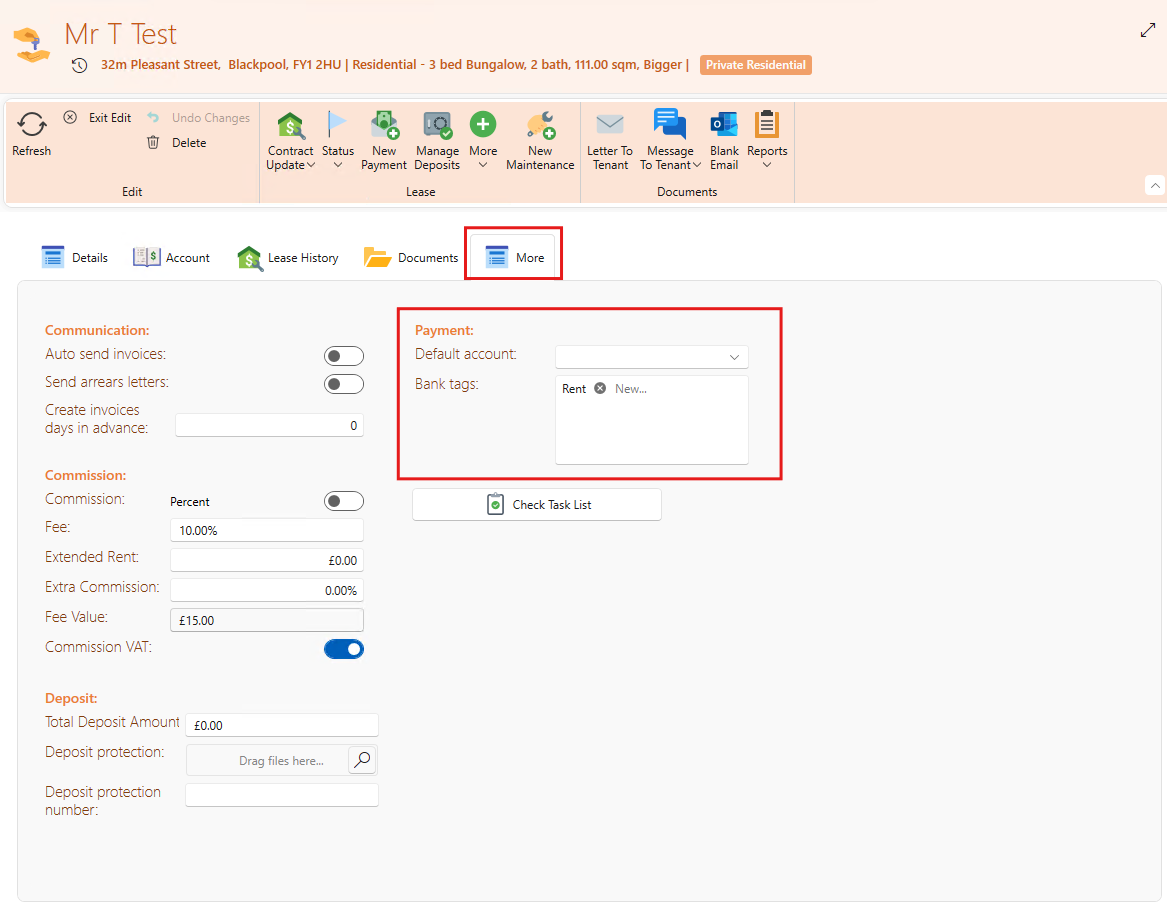
To ensure the system correctly matches incoming payments, it’s important to keep only the relevant reference in the Bank tags.
You can do this by:
- Clicking the X next to each unwanted reference to remove it, and keeping only the correct one.
- Alternatively, delete all existing tags and manually type in the correct reference. eg. National Insurance Number, Address or Tenants Initial
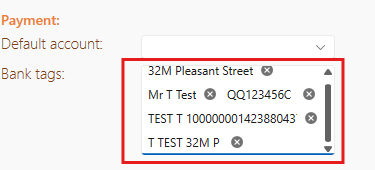
Once that’s done, the next time a payment is received, click Smart Match during reconciliation.
The system will then recognise and match the payment automatically using the reference saved in Bank tags.