
Overview
A new commission security feature has been introduced in the Landlord Statement window to help identify and flag potential inconsistencies in commission setup. This enhancement ensures that commission rates and amounts remain accurate across tenant payments, leases, and properties.
When creating a landlord statement, the system now automatically checks for mismatches based on two key validation rules.
How the Feature Works
When generating an LL statement, the system performs two commission checks:
Tenant Payment vs. Lease Default Commission
The system verifies whether each tenant payment’s commission amount matches the default commission percentage set on the lease page.
A mismatch is flagged when:
Payments were collected before the commission was configured on the lease.
The lease’s default commission rate was updated after payments were already entered.
This warning acts as a flag only — it does not block you from saving the statement.
In some cases, the difference may be correct (for example, if the commission rate legitimately changes from a certain date).
Lease Default Commission vs. Property Default Commission
The system checks if the default commission percentage on the lease matches the default commission set at the property level.
A mismatch here also acts as a warning, not an error.
Differences can be intentional, such as when a landlord waives commission for a specific tenancy or period.
How Warnings Are Displayed
When a mismatch is found, the affected lines in the LL Statement window are highlighted in red.
You can still save and continue with the statement as the system will not block the process.
These warnings are purely informational and help you quickly identify potential commission discrepancies.
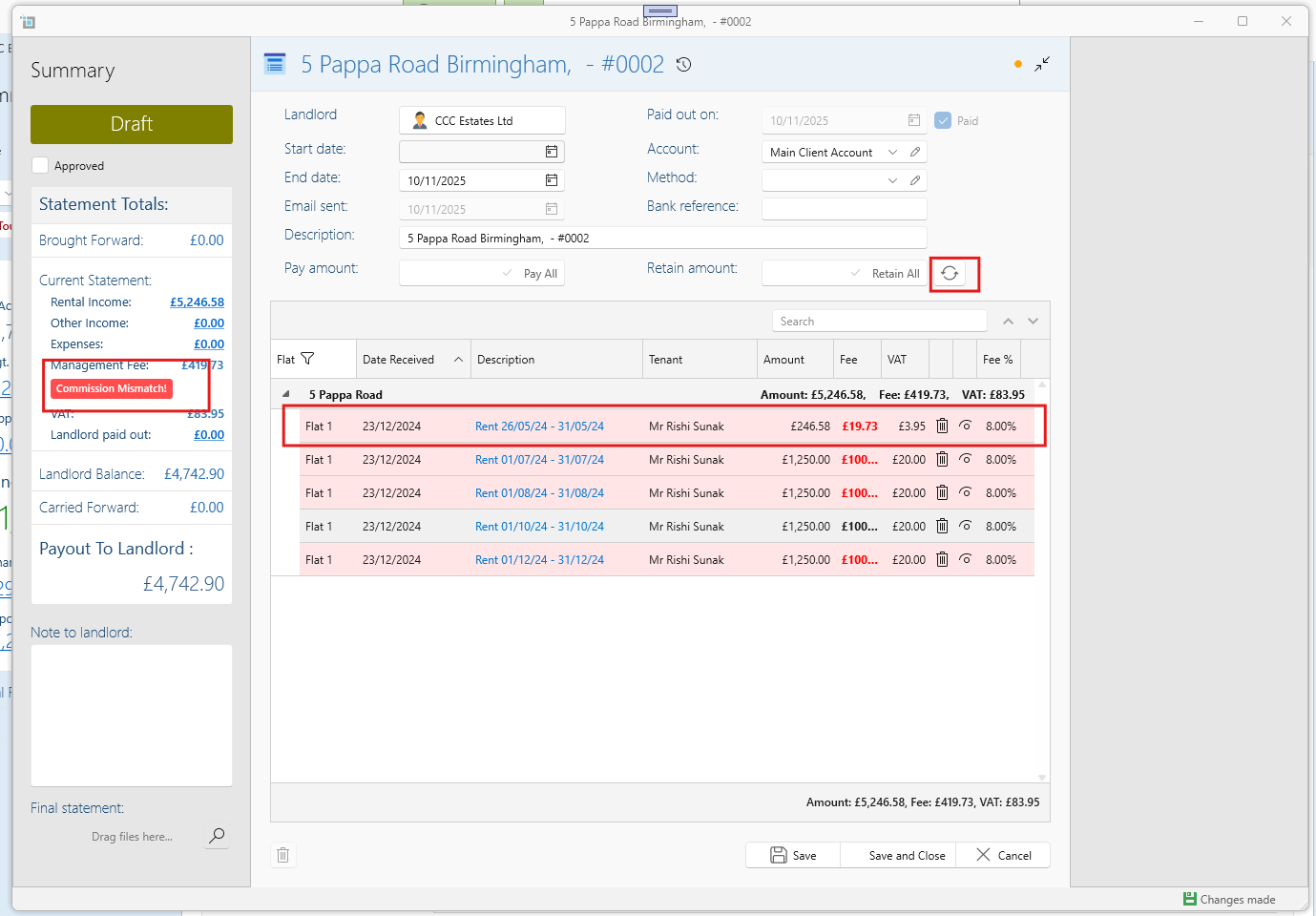
How to Review and Fix Mismatches
If a mismatch appears:
Click on the highlighted payment line to open the relevant record.
Review and reapply the correct commission if needed (for example, by updating the lease or property-level default).
Once corrected, click Refresh in the LL Statement window to reload the updated transactions.
The red highlight will disappear automatically when the values match.
Examples of When Warnings Are Expected
Commission was added or updated after some tenant payments were already recorded.
The landlord or tenancy has a waived or custom commission rate.
A rate change took effect partway through the lease period.
Key Takeaways
These mismatch warnings are non-blocking meaning you will still be able to save they help maintain consistency, not restrict workflow.
They ensure correct flow between property, lease, and payment-level commission setups.
For more information on how to set up your commission fee click on the article below:
How to set up the commission fee.