
Overview
Certain property certificates carry a legal obligation to be provided to the tenant. For example:
- Gas Safety Records must be given to each tenant at the start of a tenancy and within 28 days of every annual renewal.
- EPCs (Energy Performance Certificates) must be provided at the start of a new tenancy.
SleekTech now supports sending these certificates directly to the tenant by email from within the certificate window, with the option to configure a default behaviour per certificate type so that the right letter is pre-selected automatically.
How It Works
A "Send to Tenant" section appears in the certificate window under the "Instruct to Renew" group when both of the following are true:
1. The property has an active lease (i.e. there is a current tenant).
2. You are either creating a new certificate OR uploading / changing the attached document on an existing certificate.
When the section is visible, you can:
- Toggle "Send letter" on or off.
- Select the letter template to use (from the Certificate to Tenant letter group).
- Review or edit the tenant's email address (pre-filled from the tenant's contact record).
- Optionally add a CC address (pre-filled from the tenant's CC field if one is set).
When you save the certificate, if "Send letter" is switched on and a valid email address is present, the letter is sent immediately and the action is recorded in the certificate's activity log.
Setting a Default Per Certificate Type
To avoid having to manually configure the send settings every time, you can set a default on each certificate type. Go to:
Settings > Compliance > [select a certificate type and click Edit]
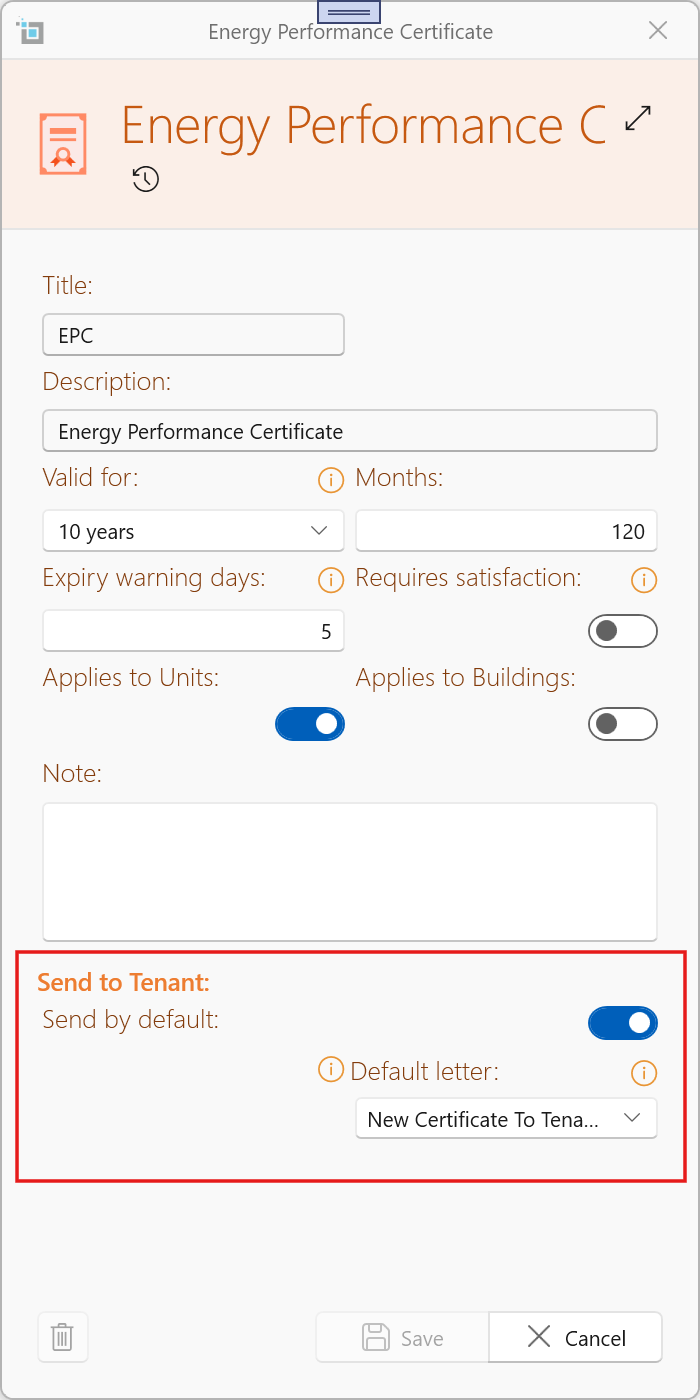
In the certificate type editor, scroll to the "Send to Tenant" section at the bottom. You will see:
- Send by default — a toggle. When switched on, the "Send letter" toggle in the certificate window will be automatically enabled whenever a new certificate of this type is created or its document is changed (provided there is an active lease on the property).
- Default letter template — the letter template to pre-select. Only templates from the Certificate to Tenant letter group are listed.
You can still override these defaults manually in the certificate window before saving.
Tips
- If you turn "Send by default" off for a certificate type, the "Send to Tenant" section will still appear in the certificate window when the conditions are met — it just won't be pre-enabled.
- If the tenant's email address is changed in the certificate window before saving, the contact record is updated automatically.
- The send action is only logged if the email is delivered successfully.