
Talk to Your Data with AI - ChatGPT, Claude & More
We are incredibly excited to introduce one of the most forward-looking updates we have ever brought to SleekTech: the ability to talk directly to your own SleekTech data using AI assistants like ChatGPT and Claude - from your phone or your computer, anywhere.
Instead of opening a screen and running a report, you simply connect SleekTech to your favourite AI assistant once, and then ask questions in plain English. It is a genuine step into the future of property management - your data, in the tools you already use every day.
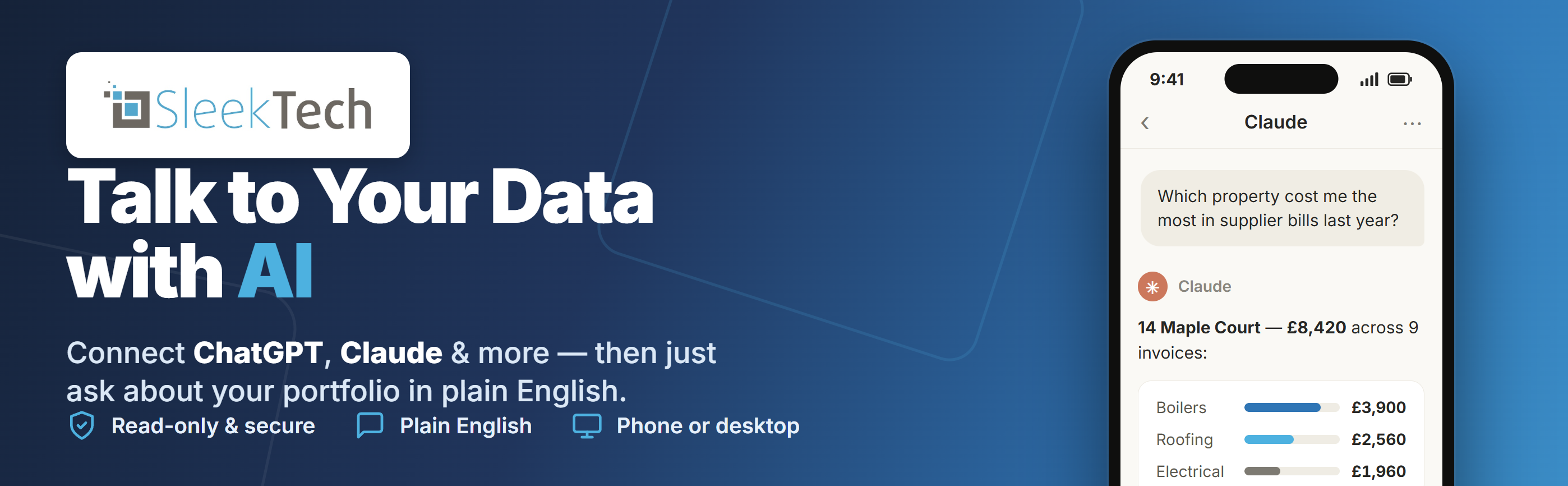
Ask Almost Anything About Your Portfolio
Because you are talking to a real AI assistant, you can ask the kind of questions that used to take real digging - and keep going with follow-ups. For example:
- "Did any of my properties need a boiler repair more than three times in the last six months?"
- "Which property cost me the most in supplier bills last year - and what was it spent on?"
- "Show me any properties where I'm spending more on suppliers than I'm collecting in rent."
- "Which of my tenants fell behind on rent this year, and by how much?"
- "How much have I paid a particular supplier across my whole portfolio?"
- "Which of my properties have a mortgage maturing in the next 12 months?"
- "Rank my landlords by the rent collected for them this year."
- "How much VAT was on my supplier invoices last quarter?"
This Is Just the Beginning - It's in Beta
We want to be open about where this feature is today. It is a brand-new, Beta capability - still early, and deliberately limited while we learn how people use it.
- Read-Only For Now - the AI can look at your data and answer questions, but it cannot change, add or delete anything in SleekTech.
- Limited Capabilities - it currently covers a focused set of your data (properties, tenancies, landlords, suppliers, and their invoices and payments). More will be added over time.
- Always Growing - as we see how people use it, we will keep expanding what it can do, with the goal of making it one of the most powerful tools in your SleekTech toolkit.
A Quick Word of Caution
AI assistants are powerful, but they are not perfect - they can occasionally misunderstand a question or present an answer incorrectly. Please treat the answers as a helpful starting point, and always confirm anything important directly in SleekTech.
Ready to Try It?
Getting connected takes just a few minutes.
Click here to see how to connect ChatGPT, Claude or Gemini
We genuinely cannot wait to see what you ask - and your feedback will directly shape where we take this next. Thank you, as always, for being part of the journey.
On the Horizon - Two New Integrations, Built Around Your Feedback
This is a period of real change across our industry, and we feel it right alongside you. We are always listening - to what is happening in the market, and above all to you. So many of you have told us where a helping hand would make the biggest difference, and we took that straight to heart and got to work. Here is an early look at two integrations designed to give you back time, clarity and genuine peace of mind.

Coming soon · Releasing shortly
Kamma - Licensing Made Simple
See exactly where every property stands on licensing — all in one clear view.
With Kamma, staying on top of property licensing becomes effortless. Every property in your portfolio is automatically matched to the licensing schemes that apply in its council area — mandatory HMO, additional and selective — so you always know exactly where you stand, at a glance.
- Instant clarity on which properties need a licence, and the confidence that nothing has slipped through.
- An automatic heads-up whenever a council introduces or updates a scheme that affects you.
- A clear, evidenced picture you can share with your landlords — and lean on for real peace of mind.
The build is almost complete, and we are excited to be releasing it shortly.

In development · Coming soon
Fixflo - Repairs, Made Effortless
Smoother repairs, happier tenants — and now your choice of partner.
Great repairs keep tenants happy and landlords loyal. Our upcoming integration with Fixflo - a leading repairs and maintenance platform - will let issues be reported, triaged, assigned to contractors and tracked all the way to completion, flowing straight into SleekTech with a tidy record behind every job.
Best of all, Fixflo will join our existing Sorto integration, so you can choose the repairs and maintenance partner that suits the way you work. This one is currently in development and coming soon.
We will share full step-by-step guides the moment each one goes live - and, as always, your feedback is exactly what shapes where we go next. Thank you for helping us make the journey easier for everyone.
Manager Statement Overview Reports
When you pay your management fees over from the client account, your bookkeeper needs to know exactly what the transfer is made up of. Two new reports on the manager statement now give you that at the press of a button.
Open any manager statement and you will find a new Reports button offering three reports:
- Statement Detail - the existing report, showing every transaction with its VAT breakdown.
- Landlord Overview - new. One line per landlord showing management fees, expenses commission, tenant income and landlord income - each split into net and VAT - with a total per landlord and a grand total that matches the amount paid over. The perfect document to hand to your bookkeeper.
- Property Overview - new. The same figures broken down further - grouped by landlord and then by property, with a line per unit and totals under each property and each landlord.
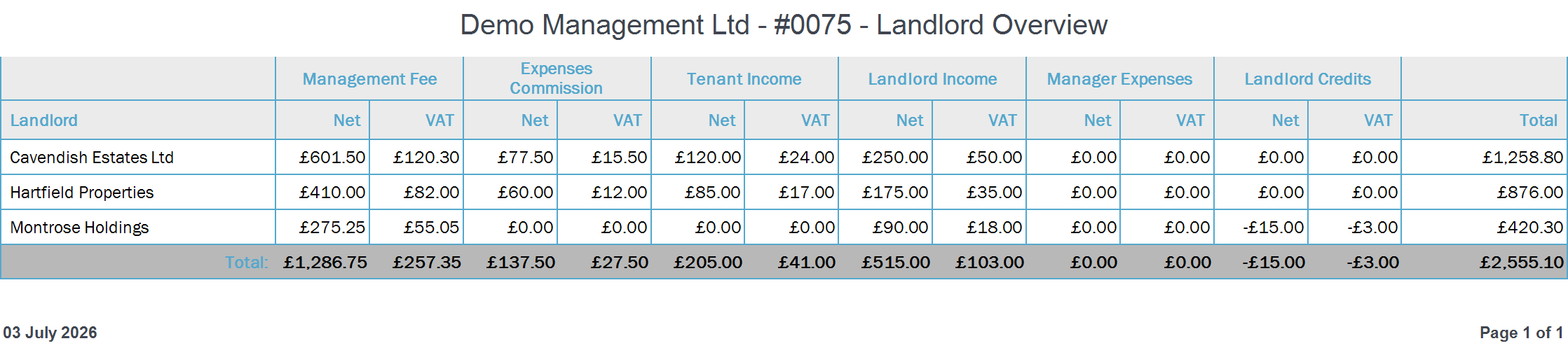
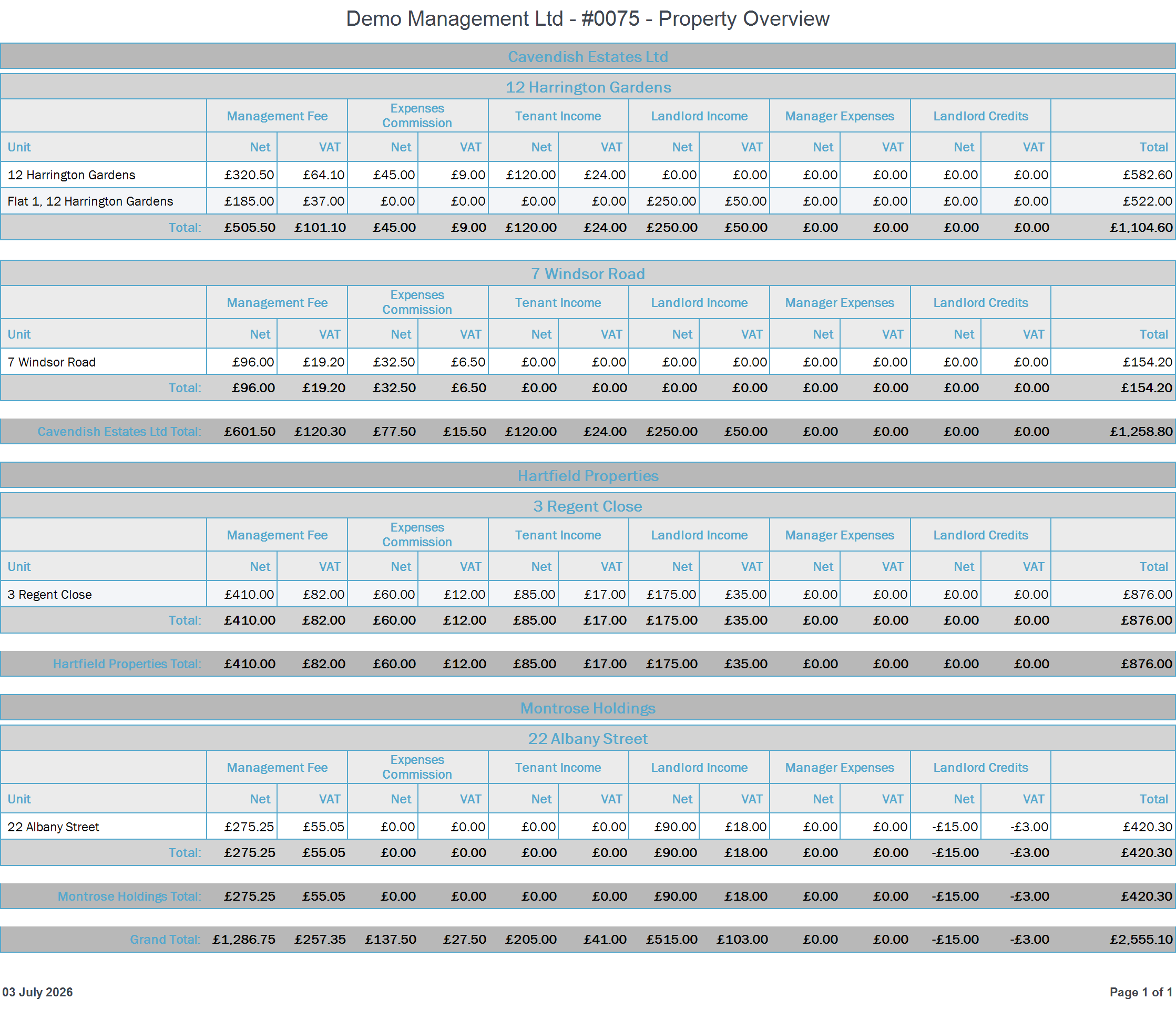
All three reports can be previewed, printed, emailed or exported to PDF and Excel. This feature came directly from a customer suggestion - please keep them coming!
See Your Portfolio on a Map
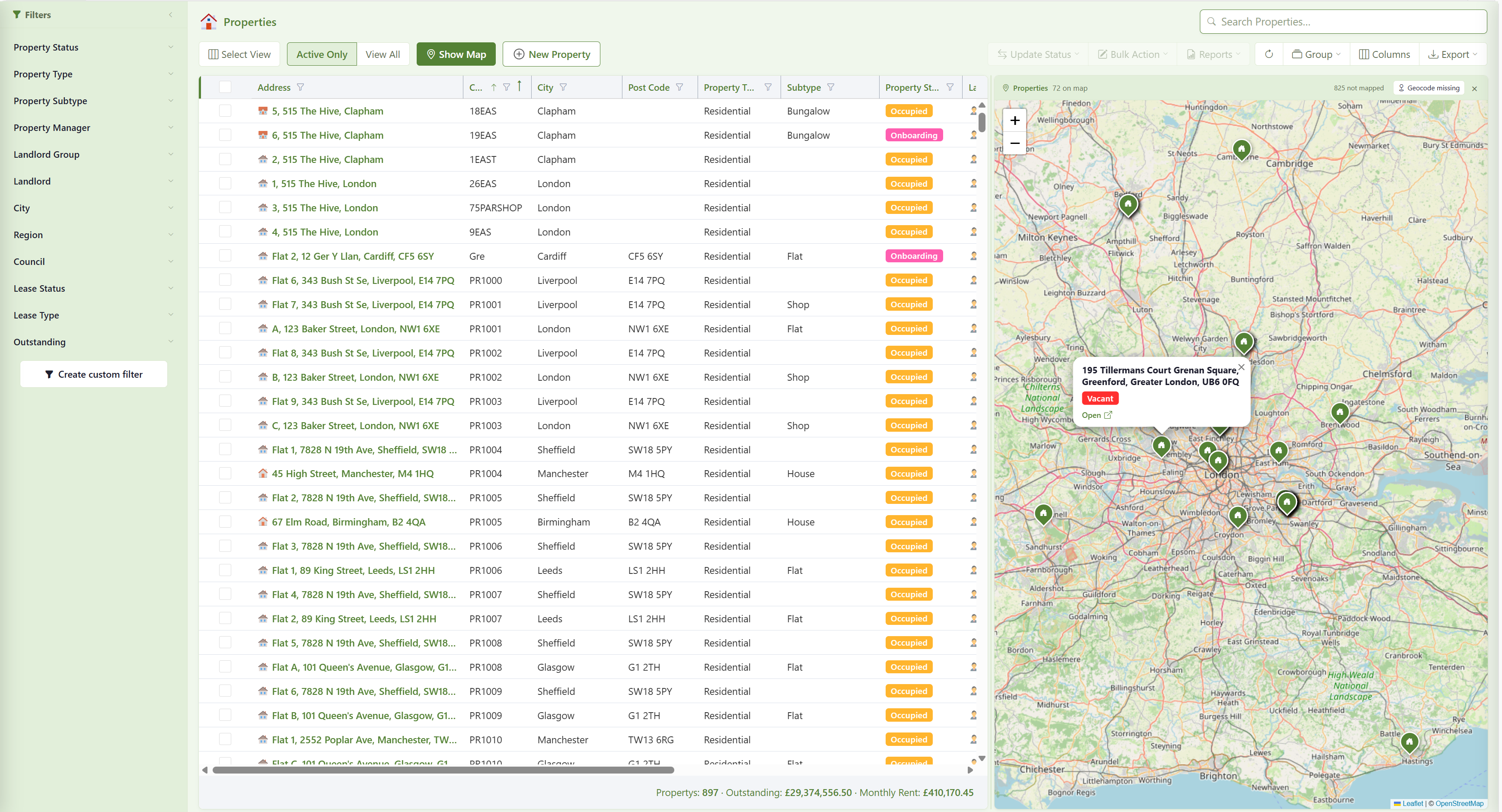
Sometimes a list just isn't enough - you want to see where your properties are. The web Properties and Maintenance screens now have a Show Map button that opens a live map right beside your grid.
- Every property in your current view appears as a pin on the map - filter or select rows in the grid and the map follows.
- Click a pin to see the property and jump straight to its page.
- On the Maintenance screen, jobs are grouped per property, so one pin shows you everything open at that address.
- If some of your properties haven't been located yet, one click finds their map position for you automatically from the address.
Your Invoice Document, Generated Automatically
When your management company invoices a landlord - management fees, recharged costs and so on - you shouldn't have to produce your own invoice document by hand. Now you don't.
Switch on the new setting, choose one of your invoice templates, and from then on SleekTech generates your invoice document and attaches it to every manager-to-landlord invoice the moment it is saved - and keeps it up to date if the invoice changes, right up until the invoice is finalised on a statement.
Click here to see how to set it up
Permitted Occupiers - Record Everyone Living at a Property
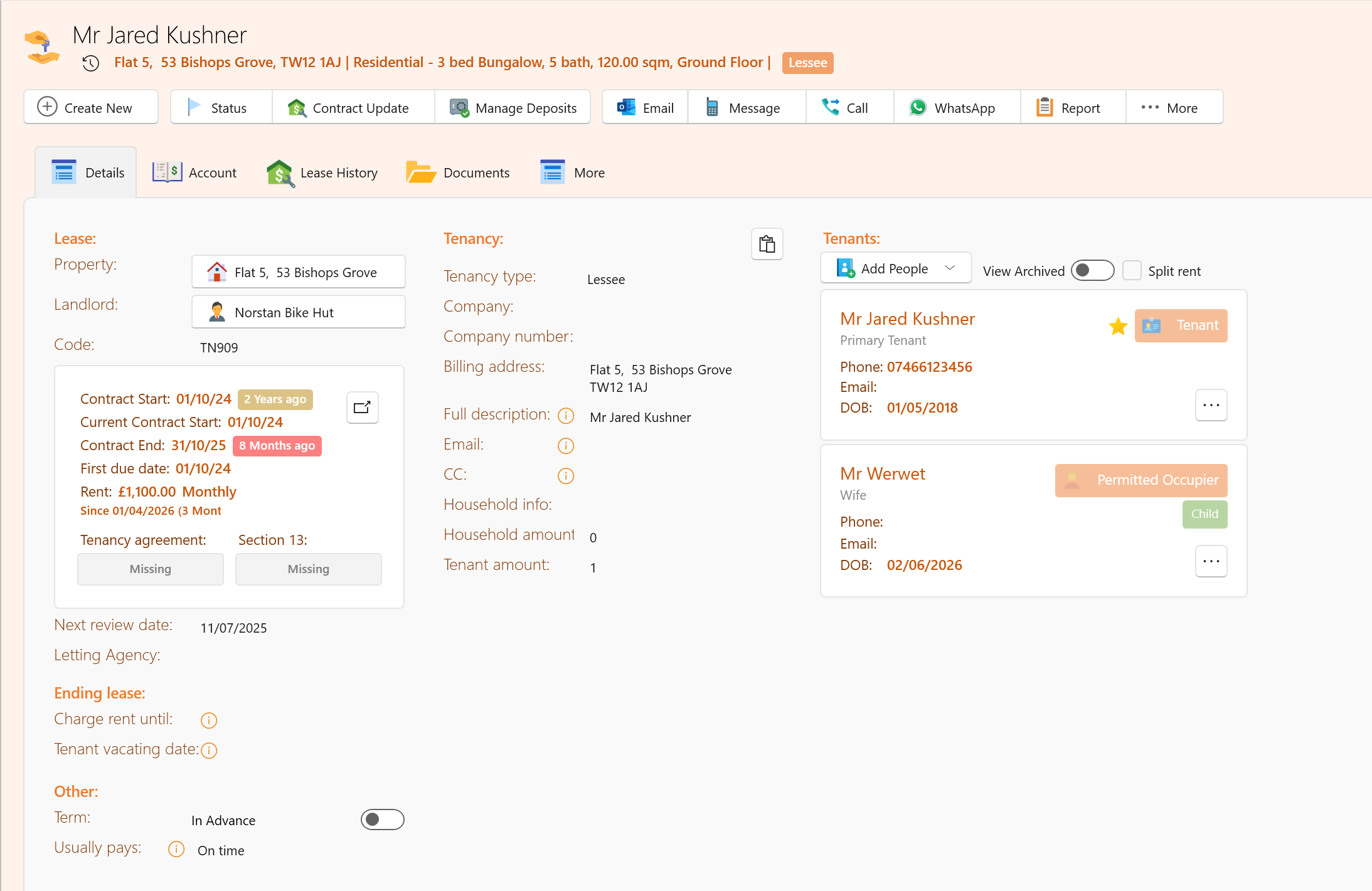
Not everyone living at a property is on the tenancy agreement - children being the most common example. Until now there was no proper way to record them. Introducing the Permitted Occupier.
A permitted occupier is someone who lives at the property with the landlord's permission but is not a party to the contract. Recording them matters: they count towards occupancy for overcrowding and HMO licensing, and adult occupiers still need their residency documents checked.
- When creating a tenancy - or on an existing one - open the add-people menu and choose Permitted Occupier.
- Enter their Date Of Birth and Residency Type - both are required, because together they decide what documents are needed.
- Occupiers under 18 are shown with a green Child badge on the tenancy and need no documents at all.
- Occupiers 18 or over are asked for the same residency documents as a tenant - a passport, plus a Right to Rent check for international residents. And if a child occupier later turns 18, SleekTech starts asking for their documents automatically.
- Permitted occupiers appear on the tenancy right after the tenants, so the full household is always visible at a glance.
New Filters in the Accounts Analyser
The Analyse feature is one of the most powerful reporting tools in SleekTech - and it just became more flexible. Four new filter fields are now available in the analyser:
- Manager - slice your figures by property manager.
- Type and Sub Type - compare houses against flats, commercial against residential, and so on.
- Lease Type - separate your tenancy types, for example social housing from private lets.
Drag any of them into your view to filter, group or compare - and save the view to come back to it any time.
Click here to learn how to use the Analyse feature
Fixed: Pictures in Letters Now Fit the Page
Previously, when a picture was attached to a mail-merge letter - an invoice scan, a photo, a supporting document - a large image could be printed at its full size and end up cropped at the edge of the page.
That's now fixed: every attached image is automatically scaled down to fit the page and centred, so the whole picture is always visible. Smaller images are left at their natural size - nothing is ever blown up or distorted.
Thank you, as always, for your continued support and feedback - so much of what is in this update came directly from your suggestions.